 Sahil Sahu
On this page
When I first started learning web development, stacks felt like identities.
You were a MERN developer.
Or a Next.js developer.
Or a Python developer.
And every tutorial seemed to have a different answer for what I should learn.
The problem is that this is the wrong way to think about it.
A stack is just a collection of tools.
What actually matters is whether you understand:
how the browser works,
how React updates a UI,
how a frontend talks to a server,
how authentication works,
how databases model data,
how APIs are designed,
and how your application gets deployed.
I learned this the slower way: by spending too much time learning tools before properly understanding the ideas underneath them.
So if I had to start web development again in 2026, here is the path I would take.
TL;DR
If you are... | Start with |
|---|---|
Completely new to web development | HTML → CSS → JavaScript |
Comfortable with JavaScript but new to frontend frameworks | React |
Comfortable with React but weak at backend concepts | Node + Express |
Building modern full-stack products | Next.js + TypeScript + PostgreSQL |
Preparing for an Express-heavy company/project | React + Express + Node |
Learning databases | SQL/PostgreSQL first, MongoDB afterwards |
Building a simple client-side dashboard | React + Vite may be enough |
Building a public content/e-commerce/SaaS site | Next.js is often a strong fit |
My preferred learning order:
HTML + CSS
    ↓
JavaScript
    ↓
React
    ↓
Node.js + Express
    ↓
SQL + PostgreSQL
    ↓
TypeScript
    ↓
Next.js
    ↓
Build real products
First: MERN vs Next.js is not actually a fair comparison
This is the first thing I would fix in the way this question is usually asked.
MERN is a stack.
It stands for:
MongoDB
Express.js
React
Node.js
Next.js is a React framework.
So Next.js does not replace React.
You still write React components.
The more accurate comparison is something like this:
Classic MERN architecture
Browser
   ↓
React frontend
   ↓ HTTP / REST API
Express + Node backend
   ↓
MongoDB
A common modern Next.js architecture
Browser
   ↓
Next.js
 ├── React UI
 ├── Server Components
 ├── Route Handlers / Server Functions
 └── Data access
        ↓
    PostgreSQL
And Next.js does not force you to keep everything inside one application.
You can still build:
Next.js frontend
      ↓
Separate Node / Go / Python API
      ↓
PostgreSQL
That distinction matters.
The real question is closer to:
Should I first learn a traditional separated frontend/backend architecture, or should I jump directly into a full-stack React framework?
That is a much better question.
What is the MERN stack?
MERN combines four JavaScript-focused technologies.
MongoDB
A document-oriented database.
A record might look like:
{
  "name": "Sahil",
  "email": "sahil@example.com",
  "skills": ["React", "Node", "TypeScript"]
}
Instead of thinking primarily in tables and rows, MongoDB stores document-like objects.
Express.js
A minimal web framework for Node.js.
A tiny API can look like this:
import express from "express";

const app = express();

app.get("/api/users", async (req, res) => {
  const users = await getUsers();

  res.json(users);
});

app.listen(4000);
Express makes concepts like these easy to see:
routes,
middleware,
request/response,
authentication,
cookies,
headers,
REST APIs,
validation,
error handling.
That is one reason I still think learning some Express is extremely useful.
React
React handles your user interface.
function UserCard({ user }) {
  return (
    <article>
      <h2>{user.name}</h2>
      <p>{user.email}</p>
    </article>
  );
}
React is also used inside Next.js.
So learning React is not wasted time if you later move to Next.js.
It is required knowledge.
Node.js
Node lets JavaScript run outside the browser.
Your Express server runs on Node.
Next.js server-side code also commonly runs in a Node-compatible environment, depending on how and where you deploy it.
Why did MERN become so popular?
MERN solved a very real problem for beginners.
You could learn one language—JavaScript—and use it almost everywhere.
Frontend → JavaScript
Backend  → JavaScript
Database queries → JavaScript-like objects
That made the learning experience approachable.
It also exploded on YouTube.
Search for "full stack project," and for years you would find endless:
MERN e-commerce apps,
MERN social networks,
MERN chat apps,
MERN dashboards,
MERN authentication tutorials.
That popularity created an enormous learning ecosystem.
And that is still valuable.
Is the MERN stack dead in 2026?
No.
But I also would not build my entire identity around becoming a "MERN developer."
That label is less important than the skills underneath it.
A company may use:
React
Node.js
Express
PostgreSQL
Redis
AWS
Technically, that is not MERN.
But someone who genuinely understands MERN-style architecture could adapt quickly.
Another team may use:
Next.js
TypeScript
PostgreSQL
Prisma
Redis
Docker
The transferable skills are still:
JavaScript,
React,
HTTP,
APIs,
databases,
authentication,
server-side programming,
debugging.
The useful part of MERN is not the acronym.
It is the architecture it teaches you.
Learn concepts, not acronyms.
What is Next.js?
Next.js is a framework built on React for building web applications.
React gives you the component model.
Next.js adds many of the things production applications usually need around it.
For example:
routing,
server rendering,
static rendering,
server-side data access,
layouts,
metadata,
image handling,
route handlers,
caching primitives,
streaming,
React Server Components.
A route can be created from your folder structure:
app/
├── page.tsx
├── about/
│   └── page.tsx
└── dashboard/
    └── page.tsx
Which becomes:
/
/about
/dashboard
No React Router configuration is required for that basic setup.
React vs Next.js
One of the most common beginner questions is:
Is Next.js better than React?
That question does not really make sense.
Next.js uses React.
Think of it like this:
React
│
├── Components
├── State
├── Props
├── Hooks
└── Rendering model

Next.js
│
├── Uses React
├── Routing
├── Server rendering
├── Server Components
├── Backend capabilities
├── Caching
└── Deployment conventions
React is part of the foundation.
Next.js builds a larger application framework around it.
Why has Next.js become so common?
Because real applications need more than components.
If you start with a plain React app, eventually you may need to decide how to handle:
routing,
SEO,
server rendering,
loading states,
data fetching,
backend endpoints,
authentication,
metadata,
caching,
image optimization,
code splitting.
A framework makes more of those decisions for you.
That is also why the React documentation currently recommends starting new React applications with a framework when a framework fits the project.
But that does not mean every React app needs Next.js.
When plain React + Vite is still a great choice
Suppose you are building:
an internal admin dashboard,
a browser-only tool,
a small SPA,
an embedded application,
a frontend that talks to an existing API.
You may not need Next.js at all.
A structure like this can be perfectly good:
React + Vite
      ↓
Existing backend API
Choosing more framework than your application needs does not automatically make it better.
When Next.js makes more sense
Next.js becomes particularly attractive when your application needs several of these:
public pages,
search engine visibility,
server-side data fetching,
dynamic metadata,
mixed static and dynamic pages,
authentication,
server-side authorization,
backend routes,
content pages,
e-commerce pages,
SaaS dashboards plus public marketing pages.
For example:
/
├── marketing pages
├── blog
├── pricing
├── authentication
└── dashboard
A single Next.js project can handle that type of application comfortably.
The part beginners underestimate: Server Components
Modern Next.js introduces an idea that can feel strange if you learned classic React first.
Some components can run on the server.
For example:
export default async function ProductsPage() {
  const products = await db.product.findMany();

  return (
    <main>
      {products.map((product) => (
        <div key={product.id}>{product.name}</div>
      ))}
    </main>
  );
}
That component can fetch data on the server instead of sending browser JavaScript to fetch the same information after the page loads.
But then you might need interactivity:
"use client";

import { useState } from "react";

export function Counter() {
  const [count, setCount] = useState(0);

  return (
    <button onClick={() => setCount((count) => count + 1)}>
      {count}
    </button>
  );
}
Now you have two mental models:
Server Component
→ executes on the server

Client Component
→ can use browser APIs, event handlers and client-side hooks
This is powerful.
It is also one of the reasons I would not recommend learning Next.js before understanding React.
The honest downsides of Next.js
Next.js is good.
It is not magic.
And beginners sometimes receive a very unrealistic version of it online.
1. There are more concepts to understand
You can run into:
Server Components,
Client Components,
hydration,
caching,
dynamic rendering,
static rendering,
route handlers,
server actions/functions,
streaming,
middleware/proxy-style request handling,
runtime differences.
When you are learning React itself at the same time, this can become overwhelming.
2. Framework behavior can hide fundamentals
This code is convenient:
const users = await db.user.findMany();But a beginner should still eventually understand:
Browser
  ↓
HTTP request
  ↓
Server
  ↓
Database
  ↓
Server response
  ↓
Browser
If the framework hides everything before you understand the model, debugging becomes painful.
3. Tutorials become outdated
Web frameworks evolve quickly.
If a tutorial is based on a significantly older Next.js version, you may encounter:
different routing conventions,
different caching behavior,
different data fetching patterns,
deprecated APIs,
changed recommendations.
Use tutorials to learn.
Use documentation to verify.
4. It can tempt you to put everything in one place
Being able to write frontend and backend logic inside one codebase does not mean every system should remain a monolith forever.
Sometimes a separate backend is better.
For example:
Web app ─┐
Mobile  ─┼──→ API → database
Partner ─┘
A dedicated API can make sense when multiple clients share the same backend.
Architecture should follow requirements.
Not fashion.
Do you need TypeScript in 2026?
For serious JavaScript development, I think TypeScript is worth learning.
But not before JavaScript.
TypeScript is essentially JavaScript plus a static type system and related tooling.
Consider this:
function calculateTotal(price, quantity) {
  return price * quantity;
}

calculateTotal("500", 2);
JavaScript accepts it.
Maybe that is intentional.
Maybe it is a bug.
Now TypeScript:
function calculateTotal(
  price: number,
  quantity: number
) {
  return price * quantity;
}

calculateTotal("500", 2);
Your editor can complain before the code runs.
That feedback becomes more useful as applications grow.
TypeScript does not replace knowing JavaScript
This is important.
If this confuses you:
const result = users
  .filter((user) => user.active)
  .map((user) => user.name);
Adding types will not fix the underlying gap.
If you do not understand:
closures,
objects,
arrays,
scope,
promises,
async/await,
modules,
destructuring,
event loops,
references vs values,
TypeScript can become another layer of confusion.
Even TypeScript's own learning material assumes core JavaScript concepts instead of teaching the language from scratch.
When should you add TypeScript?
I would add it after you can comfortably build a small JavaScript project.
For example, if you can build this:
Project: simple task manager
add tasks,
delete tasks,
mark tasks complete,
filter tasks,
store them in an API/database,
handle loading/error states,
then rebuild or migrate it to TypeScript.
You will immediately understand why types are useful.
A better beginner TypeScript example
Instead of memorizing:
type Foo<T extends keyof Bar> = ...start with application data.
type User = {
  id: string;
  name: string;
  email: string;
  role: "USER" | "ADMIN";
};

function UserCard({ user }: { user: User }) {
  return (
    <article>
      <h2>{user.name}</h2>
      <p>{user.email}</p>
    </article>
  );
}
Then learn:
object types,
unions,
optional properties,
function types,
generics,
narrowing,
utility types.
Do not begin with TypeScript wizardry.
MongoDB vs PostgreSQL
This is where I would change a lot of traditional MERN learning advice.
MongoDB is useful.
But SQL deserves much more attention than many beginner roadmaps give it.
MongoDB mental model
MongoDB stores documents.
For example:
{
  "_id": "123",
  "name": "Wireless Keyboard",
  "price": 2999,
  "tags": ["keyboard", "wireless"]
}
It is flexible and can be pleasant for many workloads.
MongoDB is not "bad because relationships exist."
That would be an oversimplification.
MongoDB supports references, embedding, indexes, aggregation and transactions.
The real question is whether its document model fits your data and access patterns.
PostgreSQL mental model
PostgreSQL is relational.
You might have:
users
id | name |
|---|---|
1 | Sahil |
2 | Alex |
orders
id | user_id | total |
|---|---|---|
101 | 1 | 4999 |
102 | 1 | 1299 |
Now the relationship is explicit:
User
  ↓
Orders
And you can query it with SQL:
SELECT
  users.name,
  orders.total
FROM users
JOIN orders
  ON users.id = orders.user_id;
That is a skill worth learning even if you later use an ORM.
Why I would learn PostgreSQL before MongoDB
Not because MongoDB is obsolete.
Because SQL teaches extremely transferable database concepts:
tables,
primary keys,
foreign keys,
joins,
indexes,
constraints,
transactions,
normalization,
query planning.
Those concepts force you to think carefully about data.
That is useful whether you later work with:
PostgreSQL,
MySQL,
SQLite,
SQL Server,
PlanetScale-compatible systems,
Supabase,
Neon,
managed cloud databases.
What about Prisma and Drizzle?
Tools like Prisma and Drizzle can make database access pleasant from TypeScript.
Example:
const user = await prisma.user.findUnique({
  where: {
    id: userId,
  },
  include: {
    posts: true,
  },
});
Useful?
Absolutely.
But do not let an ORM become a substitute for learning databases.
You should still know what this means:
SELECT * FROM users WHERE id = $1;And eventually:
EXPLAIN ANALYZE
SELECT ...
That is where you start becoming more than someone who can only follow framework tutorials.
MERN vs Next.js + TypeScript
Here is the comparison I wish I had seen when I started.
Area | Classic MERN | Next.js + TypeScript |
|---|---|---|
UI | React | React |
Language | Usually JavaScript | Usually TypeScript |
Routing | Usually React Router | File-system routing |
Backend | Separate Express API | Can live inside Next.js or separately |
Database | Commonly MongoDB | Database-agnostic |
Beginner clarity | Easier to see frontend/backend boundary | More concepts at once |
Server rendering | Requires additional setup/framework choices | Built into the framework |
Type safety | Optional | Common and encouraged |
API design learning | Very explicit | Can be abstracted away if you aren't careful |
Deployment | Often frontend + backend separately | Can often be deployed together |
Best use | Learning separated web architecture, existing MERN systems | Modern React full-stack applications |
Biggest risk | Tutorial-project repetition | Framework magic without fundamentals |
Which one is easier to learn?
MERN is easier to understand architecturally
You can literally run:
localhost:5173 → frontend
localhost:4000 → backend
localhost:27017 → database
Your frontend makes a request:
fetch("http://localhost:4000/api/users");Your backend receives it:
app.get("/api/users", handler);That boundary is obvious.
And beginners benefit from seeing it.
Next.js is easier to ship with once you understand the model
You can often keep:
frontend
backend routes
server rendering
metadata
authentication integration
inside one project.
That can dramatically reduce setup work.
But "less setup" and "easier to learn" are not the same thing.
Which is better for SEO?
This section needs nuance.
People often say:
React has bad SEO. Next.js has good SEO.
That is too simplistic.
Search engines can process JavaScript.
But rendering strategy still matters.
A plain client-rendered application may initially send something close to:
<div id="root"></div>
<script src="/app.js"></script>
The browser then executes JavaScript to build the page.
A server-rendered page can send meaningful HTML immediately.
That can be useful for:
content sites,
blogs,
product pages,
landing pages,
documentation,
public profiles.
So if organic search matters, using a framework with good server/static rendering support is usually more convenient than manually building that infrastructure yourself.
My recommended roadmap for 2026
Stage 1 — HTML + CSS
Learn:
semantic HTML,
forms,
accessibility basics,
responsive layouts,
Flexbox,
Grid.
Build
landing page,
pricing page,
portfolio page.
Do not spend three months here.
Get competent and move forward.
Stage 2 — JavaScript
This is where I would spend serious time.
Core topics
variables,
functions,
arrays,
objects,
scope,
closures,
destructuring,
modules,
DOM,
events,
promises,
async/await,
error handling.
Build
Weather app
Expense tracker
Search/filter application
Stage 3 — React
Learn:
components,
props,
state,
event handlers,
conditional rendering,
lists,
controlled forms,
useEffect,
useRef,
custom hooks,
state lifting,
data fetching.
Build something with real state
Not another static Netflix clone.
Build:
A project management app
Features:
projects,
tasks,
filters,
search,
optimistic UI,
loading states,
error states.
At this stage, storing data in a fake API is fine.
Stage 4 — Node + Express
Now make your application real.
Learn:
HTTP methods,
routes,
middleware,
validation,
cookies,
authentication,
status codes,
REST,
error handling.
Example:
app.post("/api/projects", validateProject, async (req, res) => {
  const project = await createProject(req.body);

  res.status(201).json(project);
});
Build
Turn the project-management frontend into a full-stack app.
Stage 5 — SQL + PostgreSQL
Learn SQL directly.
Not only through an ORM.
You should be able to write
CREATE TABLE users (
  id UUID PRIMARY KEY,
  email TEXT NOT NULL UNIQUE
);
Then:
SELECT *
FROM users
WHERE email = 'example@example.com';
Then:
SELECT
  projects.name,
  COUNT(tasks.id) AS task_count
FROM projects
LEFT JOIN tasks
  ON tasks.project_id = projects.id
GROUP BY projects.id;
Learn:
tables,
relationships,
joins,
constraints,
transactions,
indexes.
Stage 6 — TypeScript
Now migrate part of your application.
Start with:
type Project = {
  id: string;
  name: string;
  status: "ACTIVE" | "ARCHIVED";
};
Then type:
API responses,
form values,
components,
service functions.
Do not chase advanced types yet.
Stage 7 — Next.js
Now Next.js will make much more sense.
Learn:
App Router,
layouts,
Server Components,
Client Components,
route handlers,
loading/error boundaries,
metadata,
caching,
authentication patterns.
Rebuild one previous project
This is important.
Do not learn Next.js while simultaneously inventing a massive startup.
Take something you already understand.
Then compare.
Ask:
What became easier?
What became harder?
What disappeared?
What did the framework abstract?
Where does code execute?
That comparison teaches you more than another tutorial.
Project ladder I would use
Instead of asking:
Which stack should I master?
Do this.
Project 1 — JavaScript
Expense tracker
Learn:
arrays,
forms,
localStorage,
filtering.
Project 2 — React
Job application tracker
Learn:
state,
components,
filters,
custom hooks,
forms.
Project 3 — React + Express + PostgreSQL
Team task manager
Learn:
APIs,
auth,
database relationships,
deployment.
Project 4 — Next.js + TypeScript
Rebuild Project 3.
Learn:
server/client boundaries,
typed data,
server rendering,
framework conventions.
Project 5 — Real product
Now build something somebody might actually use.
Requirements:
authentication,
database,
real users,
analytics,
errors,
deployment,
feedback.
At that point, your learning becomes much closer to software engineering.
A decision tree
Are you new to programming?
│
├── Yes
│   └── Learn JavaScript first
│
└── No
    │
    ├── Do you know React?
    │   │
    │   ├── No → Learn React
    │   │
    │   └── Yes
    │   │       │
    │   │       ├── Do you understand APIs/backends?
    │   │       │   ├── No → Build one Express API
    │   │       │   └── Yes
    │   │       │
    │   │       └── Learn TypeScript + Next.js
    │   │
    │   └── Learn SQL somewhere along the way
Final answer
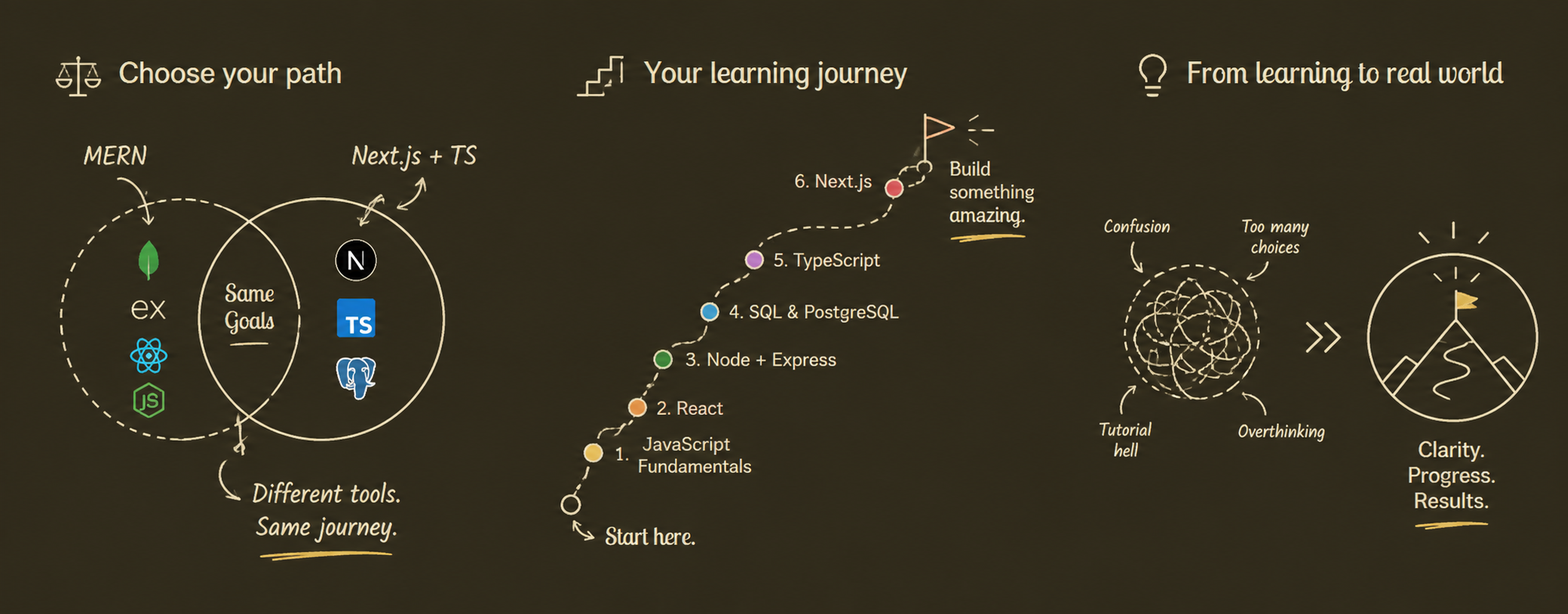
If I were starting again in 2026, I would not choose between "becoming a MERN developer" and "becoming a Next.js developer."
I would build the foundation in this order:
1. HTML + CSS
2. JavaScript
3. React
4. Node + Express fundamentals
5. SQL + PostgreSQL
6. TypeScript
7. Next.js
8. Real products
That gives you the best part of both paths.
MERN-style development teaches you how the pieces of a web application communicate.
Next.js shows you how many of those pieces can be integrated into a modern React framework.
TypeScript helps you manage complexity.
SQL gives you durable database knowledge.
And none of those matter if you never build anything.
The best stack is not the one with the most hype. It is the one you understand well enough to ship, debug and improve.
Stop spending weeks comparing stacks.
Build a project.
Deploy it.
Break it.
Fix it.
Then build the next one.
Before you leave: a challenge
If you're learning web development right now, do this:
Pick one small product idea
Build the frontend
Add a real API
Add a database
Deploy it
Give the URL to five people
Fix the problems they find
That will teach you more than another ten hours of "MERN vs Next.js" videos.